
A journey from simple Flask app to a self-discovering, auto-deploying calculation platform
The Challenge
We needed a platform to host interactive engineering calculators with rich mathematical documentation. The requirements seemed simple enough:
- Interactive calculators with real-time plots
- Mathematical documentation with LaTeX rendering
- Embeddable in WordPress via iframes
- Standalone pages with full functionality
- Easy to add new calculators without manual configuration
But as with any good technical challenge, the devil was in the details.
The Stack
We chose FastAPI for its speed, automatic API documentation, and native async support. For the first calculator - a rectifier and capacitor design tool - we needed:
- Python-Markdown for content rendering
- Plotly for interactive charts with real-time updates
- Pint for unit handling
- MathJax for LaTeX rendering
- Nginx as reverse proxy
Sounds straightforward? Keep reading.
The Architecture: Discovery Over Configuration
The core innovation was eliminating manual configuration. Instead of maintaining route lists and nginx configs by hand, we built a self-discovering system.
Auto-Discovery Pattern
class Discover:
    def get_routers(self):
        # Scan routers/ directory for app_*.py files
        router_files = self.router_path.glob("app_*.py")

        for file in router_files:
            # Import and register each router
            mod = importlib.import_module(f"routers.{file.stem}")
            router = getattr(mod, "router")

            if enabled and isinstance(router, APIRouter):
                self.routers[file.stem] = router
Every new calculator is just a new app_*.py file in the routers/ directory. Drop it in, and it's automatically:
- Registered with FastAPI
- Added to the nginx configuration
- Listed on the development homepage
No manual route registration. No config file updates. Just write your calculator and go.
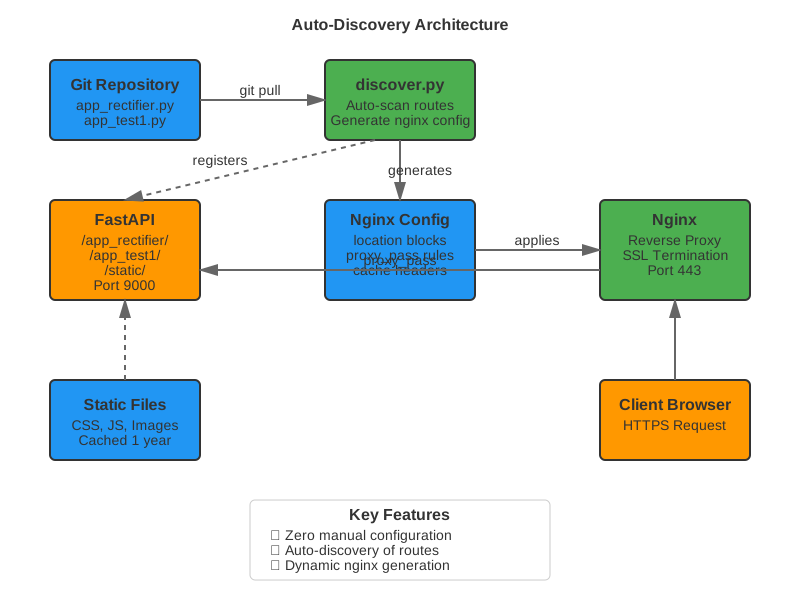
Figure 1: The auto-discovery system eliminates manual configuration
Dynamic Nginx Generation
Here's where it gets interesting. The same discovery script generates nginx configuration:
def make_nginx_blocks(self):
    # Generate proxy block for each discovered route
    for prefix, router in self.routers.items():
        block = f"""
location /{prefix}/ {{
    proxy_pass http://127.0.0.1:9000/{prefix}/;
    proxy_set_header Host $host;
    # ... proxy headers
}}
"""
Discovery Pattern: Content Too
The discovery pattern extends beyond routes. Blog posts are also auto-discovered:
def discover_blog_posts() -> list:
    """Scan blog directory for markdown files"""
    posts = []
    for md_file in BLOG_DIR.glob("*.md"):
        # Extract title from first heading
        # Extract description from first paragraph
        # Extract date from italicized text
        slug = md_file.stem.lower().replace('_', '-')
        posts.append({
            'slug': slug,
            'title': metadata['title'],
            'description': metadata['description'],
            'date': metadata['date']
        })
    return posts
Result: Drop a .md file in pages/blog/ and it's instantly published. No route definitions, no hardcoded metadata, no index updates. The system discovers it.
Want to publish this very blog post? Just save the markdown file and deploy. The system handles:
- ✅ Route creation (
/app_blog/architecture-blog-post) - ✅ Metadata extraction (title, description, date)
- ✅ Index listing (automatically appears on blog page)
- ✅ Slug generation (filename → URL)
Time to publish: 30 seconds (write, commit, deploy)
Lines of configuration: 0
But we hit a snag with static files.
The Static Files Saga
Initially, we tried serving static files directly via nginx alias directive. Seemed logical - let nginx handle static assets, FastAPI handles dynamic content.
location /static/ {
    alias /home/projects/app/static/;
    # ...
}
Result: 403 Forbidden. Every. Single. Time.
The Plot Twist
After extensive debugging (permissions, SELinux, file ownership), we discovered the real issue: Plesk interference. The hosting panel was blocking direct file access, likely due to security policies.
The elegant solution? Stop fighting it. Proxy everything to FastAPI.
location /static/ {
    proxy_pass http://127.0.0.1:9000/static/;
    # Let FastAPI handle it
}
FastAPI's StaticFiles middleware served files perfectly:
app.mount("/static", StaticFiles(directory="static"), name="static")
Lesson learned: Sometimes the "performance optimal" solution (nginx serving static files) isn't worth the complexity. The "proxy everything" approach worked immediately and performs well enough.
Content Rendering: Markdown with Superpowers
The calculators needed rich documentation with: - LaTeX equations (inline and display) - Images with styling - Cross-references between pages - Iframe support for WordPress embedding
LaTeX Preservation
Markdown processors destroy LaTeX. They see $x^2$ and think "time to process this!" So we protect LaTeX expressions before markdown touches them:
# Store LaTeX in placeholders
content = re.sub(r'\$\$(.+?)\$\$', store_display_math, content)
content = re.sub(r'\$(.+?)\$', store_inline_math, content)

# Process markdown
html = markdown.convert(content)

# Restore LaTeX
html = html.replace("<!--LATEX0-->", "$$x^2$$")
MathJax then renders the LaTeX in the browser. Beautiful equations, intact.
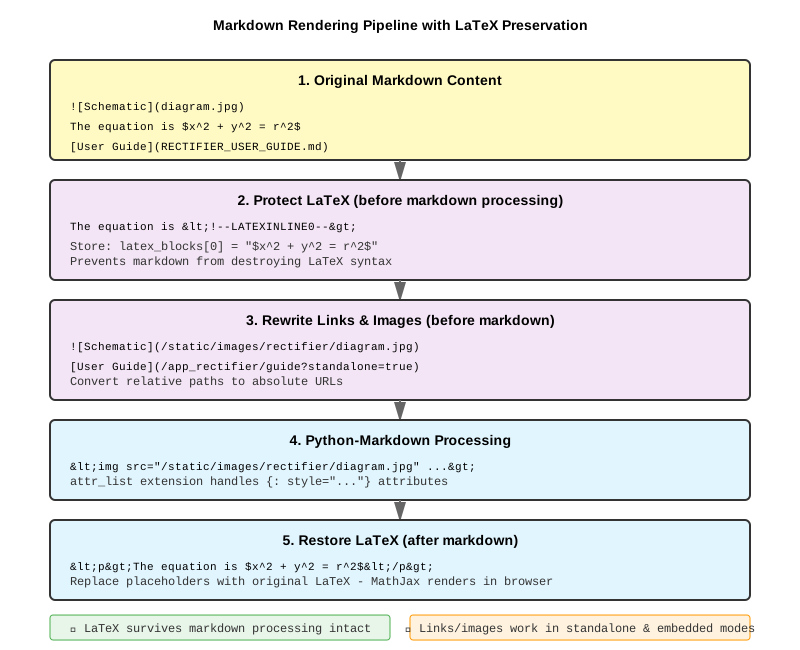
Figure 2: LaTeX protection ensures equations survive markdown processing
Link Rewriting
Markdown files reference each other: [User Guide](RECTIFIER_USER_GUIDE.md)
But we need URLs: [User Guide](/app_rectifier/guide?standalone=true)
So we rewrite them during rendering:
def rewrite_link(match):
    text, url = match.groups()

    if url.endswith('.md'):
        route = filename_to_route(url)
        return f'[{text}]({route}?standalone={standalone})'

    return match.group(0)
Images too:  becomes 
The attr_list Extension
For image styling, we use Python-Markdown's standard attr_list extension:
{: style="width: 60%; display: block; margin: 0 auto;"}
*Figure 1: Single-phase bridge rectifier*
{: style="text-align: center; font-style: italic;"}
Both image and caption centered. Clean markdown syntax. No HTML soup.
Interactive Plots: Real-Time Updates
The rectifier calculator has interactive sliders that update plots in real-time. The key: AJAX + Plotly.react().
The Flow
- User moves slider
- JavaScript captures
onchangeevent - POST data to
/plot_dataendpoint - Server calculates new results
- Return JSON with Plotly data
- Client updates plot with
Plotly.react()
function updatePlots() {
    const formData = new FormData();
    formData.append('capacitance', slider.value);

    fetch('/app_rectifier/plot_data', {
        method: 'POST',
        body: formData
    })
    .then(response => response.json())
    .then(data => {
        // Update plot without full page reload
        Plotly.react(plotDiv, data.discharge.data, data.discharge.layout);
    });
}
No page refresh. Instant feedback. Smooth experience.
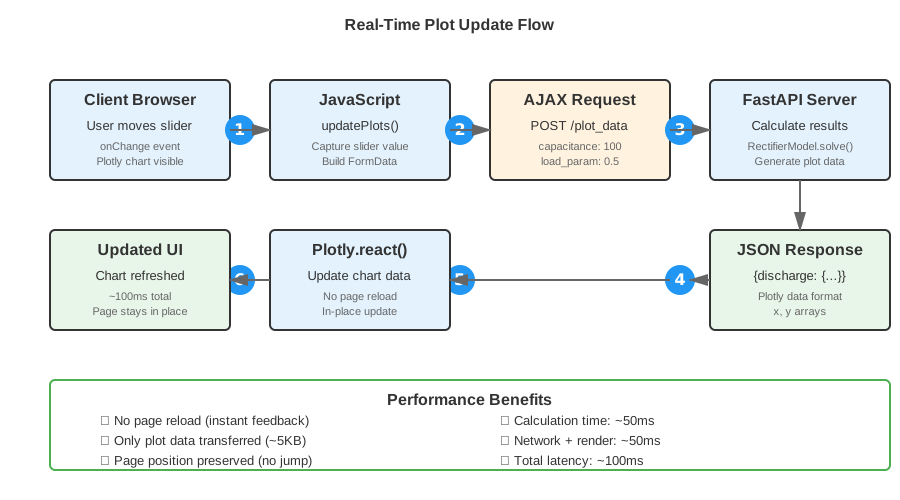
Figure 3: AJAX-based plot updates happen in ~100ms without page reload
Avoiding the Page Jump
Initial implementation reloaded the entire plot container, causing the page to jump to the top. Frustrating for users.
Solution: Update plot data, not HTML structure. Plotly.react() updates existing plots in-place. Page stays put.
Dual Mode: Standalone and Embedded
Every page works in two modes:
Standalone: Full page with logo, navigation, MathJax
https://sensemagic.nl/app_rectifier/math?standalone=true
Embedded: Clean content for WordPress iframes
https://sensemagic.nl/app_rectifier/math?standalone=false
Iframe Height Communication
When embedded, the iframe needs to tell WordPress its height:
function sendHeight() {
    const height = document.body.scrollHeight;
    parent.postMessage({iframeHeight: height}, "*");
}

window.onload = sendHeight;
window.onresize = sendHeight;

// Watch for DOM changes (plot updates, etc.)
new MutationObserver(sendHeight).observe(document.body, {
    childList: true,
    subtree: true
});
WordPress receives the message and resizes the iframe. No scrollbars, no clipping.
Git-Driven Deployment
On the production server, deployment is a single command:
./discover.sh --git-pull --update-nginx --restart-supervisor
This: 1. Pulls latest code from GitHub (main branch) 2. Discovers all routes 3. Generates nginx configuration 4. Applies config and restarts nginx 5. Restarts FastAPI via supervisor
The Execute Permissions Dance
One subtle issue: shell scripts need execute permissions (chmod +x). But Git on Windows doesn't preserve these, causing conflicts on Linux.
Solution: Set execute bit in Git index before pushing:
git update-index --chmod=+x app/*.sh
git commit -m "Set execute permissions in Git"
Now scripts are executable immediately after git pull. No manual chmod needed.
The Result
A platform where adding a new calculator is as simple as:
- Create
pages/calculator_name/with Python models and markdown docs - Create
routers/app_calculator_name.pywith routes - Add templates in
routers/templates/calculator_name/ - Commit and push
The system handles:
- ✅ Route registration
- ✅ Nginx configuration
- ✅ Static file serving
- ✅ Markdown rendering with LaTeX
- ✅ Image path rewriting
- ✅ Link rewriting
- ✅ Standalone/embedded modes
- ✅ Iframe communication
Key Architectural Decisions
1. Discovery Over Configuration
Why: Reduces friction for adding features. No central config file to update.
Trade-off: Slightly magical. New developers need to understand the convention.
2. Proxy Static Files to FastAPI
Why: Eliminates permission issues with Plesk. Simple and reliable.
Trade-off: Minor performance hit vs. nginx serving files directly. Negligible in practice.
3. Markdown with Custom Rendering
Why: Clean content authoring. Math-friendly. Version controllable.
Trade-off: Custom code for link/image rewriting. Worth it for the DX.
4. Real-Time Plot Updates via AJAX
Why: Better UX than full page reloads. Feels responsive.
Trade-off: More JavaScript complexity. State management needed.
5. Dual Standalone/Embedded Modes
Why: Flexibility. Works as standalone site or embedded in WordPress.
Trade-off: Two rendering paths to maintain. Templates need mode awareness.
6. Content Auto-Discovery (Blog Posts)
Why: Extends discovery pattern to content. Publish by adding markdown file.
Trade-off: Less control over ordering/featured posts. Metadata extraction may miss edge cases.
Performance Characteristics
- First page load: ~800ms (includes MathJax CDN)
- Plot update: ~100ms (calculation + network + render)
- Blog post discovery: ~5ms (scans directory once per request)
- Static files: Cached 1 year (immutable)
- Math rendering: Client-side (MathJax)
Plenty fast for technical documentation and interactive tools.
What We'd Do Differently
1. Typed Configuration
If starting fresh, we'd use Pydantic models for configuration:
class CalculatorConfig(BaseModel):
    name: str
    route_prefix: str
    template_dir: Path
    docs_dir: Path
2. Async All The Way
Some calculation-heavy routes could benefit from async processing:
@router.post("/calculate")
async def calculate(params: CalculatorParams):
    result = await run_calculation(params)
    return result
3. Frontend Framework for Complex Interactions
For very complex calculators, React/Vue would provide better state management than vanilla JS.
But for the current use case, vanilla JS with Plotly works great.
Lessons Learned
1. Simple beats clever Proxying static files through FastAPI is "wrong" by conventional wisdom. But it works perfectly and eliminated hours of debugging.
2. Standards are your friend
Using Python-Markdown's attr_list extension instead of custom syntax meant less code and better compatibility.
3. Auto-discovery scales What started as a convenience feature (auto-route registration) became the architectural foundation. New calculators take minutes to add.
4. Git permissions matter
Setting execute bits in Git (git update-index --chmod=+x) saves headaches in cross-platform development.
5. Progressive enhancement works Start with server-rendered HTML. Add AJAX for better UX. Page works even if JS fails to load.
The Stack, Revisited
After building this, here's what each piece really does:
- FastAPI: Request routing, API endpoints, static file serving
- Python-Markdown: Content rendering with LaTeX preservation
- Plotly: Interactive charts with real-time updates
- MathJax: Client-side LaTeX rendering
- Nginx: Reverse proxy, SSL termination, cache headers
- Supervisor: Process management, auto-restart
- Git: Version control, deployment trigger
And the glue that holds it together: discovery.py, 200 lines that eliminate manual configuration.
Try It Yourself
The rectifier calculator is live at:
https://www.sensemagic.nl/app_rectifier/?standalone=true
Interactive sliders, real-time plots, mathematical documentation with LaTeX, and embedded images. All from markdown files and Python code.
The architecture is reusable for any domain needing interactive calculations with rich documentation. Engineering, finance, physics, chemistry - anywhere you need math + interactivity + documentation.
Closing Thoughts
We set out to build a calculator. We ended up with a platform.
The key insight: configuration is code smell. If you're manually maintaining route lists, config files, and deployment scripts, you're doing it wrong. Make the system discover itself.
FastAPI gave us the tools. Python-Markdown gave us the content layer. Plotly gave us the interactivity. But the architecture - the auto-discovery, the dual-mode rendering, the git-driven deployment - that emerged from solving real problems.
Sometimes the best architecture isn't the one you design upfront. It's the one that evolves as you solve actual problems.
Build. Deploy. Iterate. Discover.
Built with FastAPI, Python-Markdown, Plotly, and late-night debugging sessions. Deployed on nginx with Plesk, because sometimes you work with what you've got.
Want to build something similar? The patterns here work for any domain. Start simple. Add complexity only when needed. And always, always automate deployment.
Stack: FastAPI • Python-Markdown • Plotly • MathJax • Nginx • Supervisor
Lines of Code: ~2,200 Python, ~500 JavaScript, ~1,200 Markdown
Time to Add New Calculator: ~30 minutes
Time to Add New Blog Post: ~30 seconds
Time to Deploy: ~2 minutes
December 30, 2025